Widget 型別詳解
上一章講了 Widget 模式的整體規則。這一章把 15 種控制項一種一種講:什麼時候選它、在兩個版本長什麼樣、
要填哪些欄位、在編輯器裡怎麼設、.nxlay 與 C 端怎麼寫、常見的坑。
每一節都用同一個順序:用途、外觀、欄位與旗標、編輯器裡怎麼設、範例、常見錯誤。
型別名稱。 ABI 4.0 把三個型別改了名字(編號不變):
4.0 名稱( NX_WTYPE_*)3.x 舊名 範例檔 TABLEVALUE_LISTwidgets/table.*METERPROGRESSwidgets/meter.*CHOICERADIOwidgets/choice.*
.nxlay的type=兩種寫法都讀得進來,新檔案請寫新名稱。執行期的值、選項、資料列、樣本一律用SetWidgetProp()的屬性設定,不再有每種型別各自的專用函式。
範例檔都可以下載,而且每一個 .nxlay 範例都由本專案的測試檢查過(能解析、通過驗證、全部控制項在 40 x 12 的面板裡都看得到);
C 範例都用 C89 語法檢查過。
外觀截圖取自 PDK 內 widget_demo 範例:每張上面是視窗版、下面是終端機版。
先看共通的部分
旗標
.nxlay 裡用 flags=OPTIONAL,ACTIVATABLE 這樣的寫法(逗號分隔,不分大小寫,不加 NX_WF_ 前綴;寫錯名字是解析錯誤,不會被默默略過)。
| 旗標 | 效果 | 編輯器 Inspector |
|---|---|---|
OPTIONAL | 空間不夠時可以被隱藏(由後往前),見Widget 模式深入 | Optional 勾選 |
DECORATION | 純裝飾:不可聚焦、不參與「跨列不可重疊」檢查、畫在其他控制項下面 | Decoration 勾選 |
ACTIVATABLE | 讓唯讀的控制項可以聚焦、可以被點,並送 NX_WEVT_ACTIVATED。只有 METER、CHART、IMAGE、LABEL、VALUE 合法,且不能和 DECORATION 同時用 | Activatable 勾選(只在這五種型別出現) |
DISABLED | 停用:顯示成灰色、不可聚焦、不可操作 | 沒有勾選框,直接在 .nxlay 寫 flags=DISABLED |
PASSWORD | TEXTBOX 專用,輸入內容以遮罩字元顯示 | 沒有勾選框,直接寫 flags=PASSWORD |
ALIGN_RIGHT | 內容靠右對齊(數值欄常用) | 沒有勾選框,直接寫 flags=ALIGN_RIGHT |
每個型別都有的欄位
WidgetId、Type、Y、X、MinW、MaxW、Weight、Optional、Decoration 每種型別在 Inspector 裡都看得到;
面板宣告了欄導引線時還會多一個 XGuide。其餘欄位依型別而定,下面每一節會列出。每個欄位的意義與調整方式見編輯器那一章的 Inspector 一節。
標籤(label)不是每種型別都會畫
標籤最多 31 個字元。有畫標籤的型別:LABEL(文字本身)、VALUE(值前面的名稱)、CHECKBOX(勾選框旁的文字)、
DROPDOWN(選單前面的名稱)、BUTTON(按鈕上的字)、TABLE(第一欄的標題)、GROUPBOX(框的標題)、CHART(高度至少 2 列時的標題)。
兩個版本都不畫標籤的型別:TEXTBOX、SPIN、METER、CHOICE、FILEPICK、IMAGE、SEPARATOR。
想說明這些控制項是什麼,請在它前面(同一列,寬度算好)放一個 LABEL。
執行期能改什麼
| 你想做的事 | 用什麼 |
|---|---|
改 TEXTBOX/VALUE/FILEPICK 的文字、CHECKBOX、DROPDOWN、CHOICE、SPIN、METER 的值 | SetWidgetProp(…, NX_WP_VALUE, …)(LABEL 等沒有值的型別回 ERR_INVALID_PARAM) |
設定 DROPDOWN/CHOICE 的選項 | SetWidgetProp(…, NX_WP_ITEMS, …)(blob:每項一個 NxItemHead 加文字) |
設定 TABLE 的資料列 | SetWidgetProp(…, NX_WP_ROWS, …)(blob:每列一個 NxRowHead 加名稱與值) |
設定 CHART 的資料點 | SetWidgetProp(…, NX_WP_SERIES, …)(blob:NxSeriesHead 加 16 位元小端樣本) |
讀/預設 FILEPICK 的路徑 | GetWidgetProp/SetWidgetProp(NX_WP_VALUE,字串) |
| 暫時把某個控制項藏起來 | SetWidgetProp(…, NX_WP_HIDDEN, …) |
| 讀回目前的值 | GetWidgetProp |
所有函式都帶面板編號參數(目前恆為 0)。屬性值是 NxPropVal(先填 SizeOfStruct 與 kind);字串與 blob 在呼叫返回時已複製。
label、aux 每段最多 31 位元組,超過 SetWidgetProp 回 ERR_FULL(舊值保留);每個選項、每列的名稱與值每段最多 255 位元組,超過回 ERR_INVALID_PARAM(舊值保留)。
LABEL:靜態文字
用途:一段固定的說明文字;加上 ACTIVATABLE 就成為可以點的「連結」。要在執行期改文字請用 VALUE:
LABEL 的文字由宣告決定(要改請重新載入版面或改用 NX_WP_LABEL),把 NX_WP_VALUE 設給它會回 ERR_INVALID_PARAM。


欄位與旗標:label(文字)、min_w(要夠放下整段文字);ACTIVATABLE 選用。
編輯器:Toolbox 拖出 Label → Inspector 改 Label 與 MinW;要可以點,把 Activatable 設成 True。
; label.nxlay - one plain LABEL and one LABEL that can be clicked.
[panel]
ref_w=40
ref_h=4

[w.1]
type=LABEL
y=0
min_w=24
label=Firmware ready

[w.2]
type=LABEL
y=1
min_w=24
flags=ACTIVATABLE
label=Open datasheet/**
* @file label.c
* @brief The clickable LABEL (flags=ACTIVATABLE); a plain LABEL has no runtime API.
* A reading aid for the tutorial page "widget-types", not a complete
* plugin: the functions below would be wired into an IcPlugin
* (on_widget_event) or called from init()/a Worker callback.
*
* @note ASCII-only and C89 on purpose (VC6 / CP950 safe, and it must pass
* the syntax-only guard). The widget ids match label.nxlay.
*/
#include <string.h>
#include "nexus_plugin_api.h"
/** @brief The HostAPI table, saved by init() (not shown here). */
static const NxHostApi *s_host = (const NxHostApi *)0;
/** @brief widget id of the clickable label ([w.2] in label.nxlay). */
#define WID_DATASHEET 2
/**
* @brief Widget event handler.
* @param[in] ctx This mount's context.
* @param[in] panel_id Always 0 for now.
* @param[in] widget_id Which widget.
* @param[in] evt The event, valid during the call only. For ACTIVATED,
* evt->val is an NX_WKIND_U64 that packs the click
* position (high 16 bits vertical, low 16 bits horizontal,
* 0..65535; a key press gives NX_WPOS_KEYBOARD).
* @note I2C Worker Thread. A LABEL has no value to set: its text comes from
* the layout file.
*/
void NX_CALL label_on_event(NxPluginCtx ctx, NxByte panel_id, NxWord widget_id,
const NxWidgetEvent *evt)
{
NX_UNUSED_ARG(panel_id);
if (widget_id == WID_DATASHEET && evt->kind == NX_WEVT_ACTIVATED)
{
s_host->LogWrite(ctx, NX_LOG_INFO, "label: datasheet link clicked");
}
}常見錯誤
- 對
LABEL設NX_WP_VALUE想改字:回ERR_INVALID_PARAM。改用VALUE。 min_w比文字短,文字會被截斷。ACTIVATED的evt->val.u.u64是點擊位置的封裝(v << 16) | h(各 0~65535,鍵盤觸發為NX_WPOS_KEYBOARD),是無號數;不需要位置就不必理它。
VALUE:標籤加唯讀數值
用途:顯示一個會變的狀態,格式是「標籤:文字」,例如 Version: 1.2。文字由你的程式用 SetWidgetProp(NX_WP_VALUE,字串)寫入,使用者不能改。


欄位與旗標:label(冒號前的名稱)、min_w、weight(讓文字區能長寬);ACTIVATABLE 選用(讓它可以點)。
編輯器:拖出 Value → 改 Label、MinW、Weight。
; value.nxlay - "Version: <text>", the text is set from C.
[panel]
ref_w=40
ref_h=4

[w.1]
type=VALUE
y=0
min_w=20
weight=1
label=Version/**
* @file value.c
* @brief Writing the text of a VALUE widget.
* A reading aid for the tutorial page "widget-types", not a complete
* plugin: the functions below would be wired into an IcPlugin
* (on_widget_event) or called from init()/a Worker callback.
*
* @note ASCII-only and C89 on purpose (VC6 / CP950 safe, and it must pass
* the syntax-only guard). The widget ids match value.nxlay.
*/
#include <string.h>
#include "nexus_plugin_api.h"
/** @brief The HostAPI table, saved by init() (not shown here). */
static const NxHostApi *s_host = (const NxHostApi *)0;
/** @brief widget id of the VALUE ([w.1] in value.nxlay). */
#define WID_VERSION 1
/**
* @brief Shows text after the "Version" label.
* @param[in] ctx This mount's context.
* @param[in] text New text (UTF-8); must not be NULL.
* @return ERR_OK, or ERR_INVALID_PARAM when the widget is not a VALUE.
* @note Any thread; no event is generated for your own write.
*/
NxLong value_show(NxPluginCtx ctx, const char *text)
{
NxPropVal v;
memset(&v, 0, sizeof(v));
v.SizeOfStruct = (NxDword)sizeof(v);
v.kind = (NxWord)NX_WKIND_STR; /* a VALUE takes a string */
v.u.str.ptr = text;
v.u.str.len = (NxDword)strlen(text);
return s_host->SetWidgetProp(ctx, 0, WID_VERSION, NX_WP_VALUE, &v);
}常見錯誤
NxPropVal的kind必須是NX_WKIND_STR,種類不符回ERR_INVALID_PARAM。- 文字長度的上限是
NX_WTEXTBOX_MAX_LENGTH(32767 個碼點),超過會被截斷;影子表另有文字配額(每面板 512 KiB),用盡回ERR_FULL。 - 用
memset把NxPropVal清成 0 再填SizeOfStruct與kind。
TEXTBOX:單行文字輸入
用途:讓使用者輸入一段文字(名稱、位址、參數)。加 PASSWORD 旗標會遮罩顯示。


欄位與旗標:min_w、weight(記得給,不然只有 min_w 那麼寬);PASSWORD、DISABLED 選用。label 兩個版本都不畫。
編輯器:拖出 Textbox → 調 MinW、Weight;要遮罩就在 .nxlay 加 flags=PASSWORD。
; textbox.nxlay - a single-line text input.
[panel]
ref_w=40
ref_h=4

[w.1]
type=TEXTBOX
y=0
min_w=16
weight=1
label=Name/**
* @file textbox.c
* @brief Reading what the user typed into a TEXTBOX, and writing the box.
* A reading aid for the tutorial page "widget-types", not a complete
* plugin: the functions below would be wired into an IcPlugin
* (on_widget_event) or called from init()/a Worker callback.
*
* @note ASCII-only and C89 on purpose (VC6 / CP950 safe, and it must pass
* the syntax-only guard). The widget ids match textbox.nxlay.
*/
#include <string.h>
#include "nexus_plugin_api.h"
/** @brief The HostAPI table, saved by init() (not shown here). */
static const NxHostApi *s_host = (const NxHostApi *)0;
/** @brief widget id of the TEXTBOX ([w.1] in textbox.nxlay). */
#define WID_NAME 1
/** @brief The last committed text (copied: evt->val.u.str.ptr is only valid during the call). */
static char s_name[128] = "";
/**
* @brief Widget event handler.
* @note I2C Worker Thread. CHANGED arrives when the user commits the text
* (Enter, or moving focus away), not on every keystroke.
*/
void NX_CALL textbox_on_event(NxPluginCtx ctx, NxByte panel_id, NxWord widget_id,
const NxWidgetEvent *evt)
{
size_t n;
NX_UNUSED_ARG(ctx);
NX_UNUSED_ARG(panel_id);
if (widget_id == WID_NAME && evt->kind == NX_WEVT_CHANGED &&
evt->val.kind == NX_WKIND_STR && evt->val.u.str.ptr != (const char *)0)
{
n = evt->val.u.str.len;
if (n > sizeof(s_name) - 1)
{
/* A TEXTBOX value can be far longer (32767 code points); this demo
* keeps 127 bytes and may cut a multi-byte character. */
n = sizeof(s_name) - 1;
}
memcpy(s_name, evt->val.u.str.ptr, n);
s_name[n] = '\0';
}
}
/**
* @brief Replaces the text in the box (e.g. after loading a saved setting).
* @return ERR_OK or an error code. Does not trigger textbox_on_event().
*/
NxLong textbox_set(NxPluginCtx ctx, const char *text)
{
NxPropVal v;
memset(&v, 0, sizeof(v));
v.SizeOfStruct = (NxDword)sizeof(v);
v.kind = (NxWord)NX_WKIND_STR;
v.u.str.ptr = text;
v.u.str.len = (NxDword)strlen(text);
return s_host->SetWidgetProp(ctx, 0, WID_NAME, NX_WP_VALUE, &v);
}常見錯誤
CHANGED只在使用者「提交」時才送:按 Enter,或把焦點移到別處。不是每打一個字送一次。想即時反應請自己設計成別的互動。evt->val.u.str.ptr只在這次呼叫期間有效,要保留請複製(範例的s_name)。- 字串可以很長。 4.0 起
TEXTBOX的值最長 32767 個碼點(UTF-8 最多約 128 KB),不再是 3.x 的 127 位元組;範例的s_name[128]只留前 127 位元組,這只是示範,要完整保留請依evt->val.u.str.len配置足夠的緩衝。讀回目前的值時,先以buf == NULL、buf_cap == 0呼叫GetWidgetProp問needed再配置。 - 文字長度上限是
NX_WP_MAX_LENGTH(預設也是最大值 32767 個碼點);調小它使目前的字被截短時,會送一次CHANGED。 - 視窗版的
TEXTBOX有焦點時按鍵由它自己吃掉,不會送到on_key_press。 - 使用者可以用
Shift+方向鍵選取、Ctrl+A全選、Ctrl+←/→以詞跳(中文每個字算一個詞)、Ctrl+Z復原一步、Ctrl+C/X/V複製剪下貼上(終端機版複製用Ctrl+Shift+C或Ctrl+Insert;欄位沒有選取時這兩個鍵改複製 Log 的選取)。視窗版還可以用滑鼠拖曳選取、雙擊選詞、Shift+點擊延伸選取,按右鍵會出現Undo/Cut/Copy/Paste/Select All選單(選單文字是英文)。這些都是 Host 端的編輯動作,你的 Plugin 只在「提交」時收到CHANGED。PASSWORD欄位不能複製或剪下。
CHECKBOX:開關
用途:一個開/關的選項。


欄位與旗標:label(旁邊的文字)、min_w(要放得下勾選框加文字)。
編輯器:拖出 Checkbox → 改 Label、MinW。
; checkbox.nxlay - an on/off switch.
[panel]
ref_w=40
ref_h=4

[w.1]
type=CHECKBOX
y=0
min_w=14
label=Enable output/**
* @file checkbox.c
* @brief Reacting to a CHECKBOX and setting it from code.
* A reading aid for the tutorial page "widget-types", not a complete
* plugin: the functions below would be wired into an IcPlugin
* (on_widget_event) or called from init()/a Worker callback.
*
* @note ASCII-only and C89 on purpose (VC6 / CP950 safe, and it must pass
* the syntax-only guard). The widget ids match checkbox.nxlay.
*/
#include <string.h>
#include "nexus_plugin_api.h"
/** @brief The HostAPI table, saved by init() (not shown here). */
static const NxHostApi *s_host = (const NxHostApi *)0;
/** @brief widget id of the CHECKBOX ([w.1] in checkbox.nxlay). */
#define WID_ENABLE 1
/**
* @brief Widget event handler.
* @note I2C Worker Thread, so ExecSync() is allowed here.
*/
void NX_CALL checkbox_on_event(NxPluginCtx ctx, NxByte panel_id, NxWord widget_id,
const NxWidgetEvent *evt)
{
NX_UNUSED_ARG(panel_id);
if (widget_id == WID_ENABLE && evt->kind == NX_WEVT_CHANGED &&
evt->val.kind == NX_WKIND_I64)
{
s_host->LogWrite(ctx, NX_LOG_INFO,
(evt->val.u.i64 != 0) ? "checkbox: on" : "checkbox: off");
}
}
/**
* @brief Ticks or clears the box.
* @param[in] on Non-zero = checked.
*/
NxLong checkbox_set(NxPluginCtx ctx, int on)
{
NxPropVal v;
memset(&v, 0, sizeof(v));
v.SizeOfStruct = (NxDword)sizeof(v);
v.kind = (NxWord)NX_WKIND_I64;
v.u.i64 = (on != 0) ? 1 : 0;
return s_host->SetWidgetProp(ctx, 0, WID_ENABLE, NX_WP_VALUE, &v);
}常見錯誤
evt->val.u.i64是0或1。寫入時任何非 0 值都算勾選。on_widget_event在 Worker 上,可以直接ExecSync去寫硬體,不必再自己開執行緒。
DROPDOWN:下拉選單
用途:從固定的選項清單裡選一個。選項由 NX_WP_ITEMS 設定,最多 4096 項(.nxlay 的 item_count 只是 0~8 的版面提示);選項很少、要全部同時看得見時用 CHOICE。


欄位與旗標:label(選單前的名稱)、min_w、item_count(選項數,0~8)。選項的文字不寫在 .nxlay,由 C 端以 SetWidgetProp 的 NX_WP_ITEMS 設定。
編輯器:拖出 Dropdown → 改 Label、ItemCount。編輯器預覽用的是預設的一個選項,實際的選項由你的程式在執行期設。
; dropdown.nxlay - pick one of up to 8 items; the items come from C.
[panel]
ref_w=40
ref_h=4

[w.1]
type=DROPDOWN
y=0
min_w=20
weight=1
item_count=3
label=Mode/**
* @file dropdown.c
* @brief Filling a DROPDOWN with items and reading the chosen index.
* A reading aid for the tutorial page "widget-types", not a complete
* plugin: the functions below would be wired into an IcPlugin
* (on_widget_event) or called from init()/a Worker callback.
*
* @note ASCII-only and C89 on purpose (VC6 / CP950 safe, and it must pass
* the syntax-only guard). The widget ids match dropdown.nxlay.
*/
#include <string.h>
#include "nexus_plugin_api.h"
/** @brief The HostAPI table, saved by init() (not shown here). */
static const NxHostApi *s_host = (const NxHostApi *)0;
/** @brief widget id of the DROPDOWN ([w.1] in dropdown.nxlay). */
#define WID_MODE 1
/** @brief The items, static because the host copies them during the call only. */
static const char *const s_items[3] = { "Off", "Slow", "Fast" };
/**
* @brief Call once from init() (UI Thread).
* @return ERR_OK or an error code.
* @note NX_WP_ITEMS is a BLOB: one NxItemHead per item, followed by the item
* text, each record padded to a multiple of 4 bytes. At most 4096 items.
* The value of the widget is the item INDEX. The host copies the blob
* during the call only.
*/
NxLong dropdown_setup(NxPluginCtx ctx)
{
unsigned char buf[3 * 24];
NxPropVal v;
NxItemHead h;
NxDword pos = 0;
NxDword rec;
int i;
for (i = 0; i < 3; i++)
{
h.text_len = (NxWord)strlen(s_items[i]);
h.detail_len = 0;
h.item_id = (NxDword)i;
h.flags = 0;
rec = ((NxDword)sizeof(h) + h.text_len + 3u) & ~3u;
memset(buf + pos, 0, rec);
memcpy(buf + pos, &h, sizeof(h));
memcpy(buf + pos + sizeof(h), s_items[i], h.text_len);
pos += rec;
}
memset(&v, 0, sizeof(v));
v.SizeOfStruct = (NxDword)sizeof(v);
v.kind = (NxWord)NX_WKIND_BLOB;
v.u.blob.ptr = buf;
v.u.blob.len = pos;
return s_host->SetWidgetProp(ctx, 0, WID_MODE, NX_WP_ITEMS, &v);
}
/**
* @brief Widget event handler: evt->val.u.i64 is the chosen index (0-based).
*/
void NX_CALL dropdown_on_event(NxPluginCtx ctx, NxByte panel_id, NxWord widget_id,
const NxWidgetEvent *evt)
{
NX_UNUSED_ARG(panel_id);
if (widget_id == WID_MODE && evt->kind == NX_WEVT_CHANGED &&
evt->val.kind == NX_WKIND_I64 && evt->val.u.i64 >= 0 && evt->val.u.i64 < 3)
{
s_host->LogWrite(ctx, NX_LOG_INFO, s_items[(int)evt->val.u.i64]);
}
}
/**
* @brief Selects an item from code; index must be smaller than the item count.
*/
NxLong dropdown_select(NxPluginCtx ctx, NxDword index)
{
NxPropVal v;
memset(&v, 0, sizeof(v));
v.SizeOfStruct = (NxDword)sizeof(v);
v.kind = (NxWord)NX_WKIND_I64;
v.u.i64 = (NxI64)index;
return s_host->SetWidgetProp(ctx, 0, WID_MODE, NX_WP_VALUE, &v);
}常見錯誤
- 忘了設
NX_WP_ITEMS:選單是空的。它在init(UI Thread)設一次即可。 - 選項是屬性,不會重建面板,但不要在輪詢裡反覆改。
- 每個選項文字最多 255 位元組(
NX_WDROPDOWN_ITEM_TEXT_MAX),超過回ERR_INVALID_PARAM;每面板的文字配額(512 KiB)以實際長度計,255 位元組的選項約放 2016 項。選項另受整個行程共用的 1 MiB 套件 arena 限制(每項24 + 文字長度位元組,255 位元組的選項每項 279 位元組,全體約 3758 項),兩個面板各放 2016 項會超過,第二個回ERR_FULL;每筆 blob 記錄要補到 4 的倍數((head + body + 3) & ~3,範例的dropdown_setup示範)。 - 值(索引)要小於選項數,否則回
ERR_INVALID_PARAM。 - 選項變少時,在途的
CHANGED(索引已超出新範圍)會被丟棄,不會把錯誤的索引送給你。
BUTTON:按鈕
用途:觸發一個動作(讀一次、送一個指令、重設)。按鈕沒有持續的狀態。


欄位與旗標:label(按鈕上的字)、min_w;DISABLED 選用(灰色、不能按)。
編輯器:拖出 Button → 改 Label、MinW。
; button.nxlay - an action button.
[panel]
ref_w=40
ref_h=4

[w.1]
type=BUTTON
y=0
min_w=12
label=Read/**
* @file button.c
* @brief Reacting to a BUTTON press with a hardware read.
* A reading aid for the tutorial page "widget-types", not a complete
* plugin: the functions below would be wired into an IcPlugin
* (on_widget_event) or called from init()/a Worker callback.
*
* @note ASCII-only and C89 on purpose (VC6 / CP950 safe, and it must pass
* the syntax-only guard). The widget ids match button.nxlay.
*/
#include <string.h>
#include "nexus_plugin_api.h"
/** @brief The HostAPI table, saved by init() (not shown here). */
static const NxHostApi *s_host = (const NxHostApi *)0;
/** @brief widget id of the BUTTON ([w.1] in button.nxlay). */
#define WID_READ 1
/**
* @brief Widget event handler.
* @note I2C Worker Thread: read the hardware right here with ExecSync().
* A BUTTON has no state; evt->val is the click position (ignored here).
*/
void NX_CALL button_on_event(NxPluginCtx ctx, NxByte panel_id, NxWord widget_id,
const NxWidgetEvent *evt)
{
NxJobRequest req;
NxByte reg;
NX_UNUSED_ARG(panel_id);
if (widget_id != WID_READ || evt->kind != NX_WEVT_ACTIVATED)
{
return;
}
memset(&req, 0, sizeof(req));
req.size_of_struct = (NxDword)sizeof(req);
req.op = NX_JOB_READ;
req.offset = 0x00;
req.length = 1;
if (s_host->ExecSync(ctx, &req, ®, (NxWord)sizeof(reg)) == ERR_OK)
{
s_host->LogWrite(ctx, NX_LOG_INFO, "button: read ok");
}
}常見錯誤
- 事件是
NX_WEVT_ACTIVATED(不是CHANGED);evt->val是點擊位置的封裝(滑鼠點擊帶位置,鍵盤觸發為NX_WPOS_KEYBOARD),用不到就忽略。 - 對
BUTTON設NX_WP_VALUE回ERR_INVALID_PARAM:按鈕沒有值可以設。要改按鈕的狀態用NX_WP_ENABLED(停用)或NX_WP_HIDDEN(隱藏)。 - 處理函式在 Worker 上,可以做硬體存取,但不要在裡面做很久的事,否則這個後端的其他存取都被擋住。
TABLE:名稱與值的表格
用途:多列「名稱 + 值」的表格,例如暫存器語意表。每個 TABLE 最多 4096 列(整個面板的文字另受 512 KiB 配額限制)。
資料列由 C 端以 NX_WP_ROWS 整批寫入;捲動由主程式負責,Plugin 不用管也無法指定捲動位置。


欄位與旗標:label(名稱那一欄的標題)、min_w、weight。高度不由 h 決定,見下。
編輯器:拖出 Value List → 改 Label、MinW、Weight;高度靠調整下一列的 Y 來控制(Inspector 有 H 欄,但對它沒有作用)。
; table.nxlay - a table of name/value rows.
; The list is as tall as the distance to the next row's y (here 6 rows:
; y=0..5); its own h is ignored.
[panel]
ref_w=40
ref_h=8

[w.1]
type=TABLE
y=0
min_w=24
weight=1
label=Registers

[w.2]
type=SEPARATOR
y=6
min_w=0
weight=1/**
* @file table.c
* @brief Filling a TABLE with rows.
* A reading aid for the tutorial page "widget-types", not a complete
* plugin: the functions below would be wired into an IcPlugin
* (on_widget_event) or called from init()/a Worker callback.
*
* @note ASCII-only and C89 on purpose (VC6 / CP950 safe, and it must pass
* the syntax-only guard). The widget ids match table.nxlay.
*/
#include <string.h>
#include "nexus_plugin_api.h"
/** @brief The HostAPI table, saved by init() (not shown here). */
static const NxHostApi *s_host = (const NxHostApi *)0;
/** @brief widget id of the TABLE ([w.1] in table.nxlay). */
#define WID_REGS 1
/**
* @brief Appends one record of an NX_WP_ROWS blob: an NxRowHead, the name, the
* value, padded to a multiple of 4 bytes.
* @return The offset just after the record.
*/
static NxDword add_row(unsigned char *buf, NxDword pos, const char *name,
const char *value, NxDword style)
{
NxRowHead h;
NxDword rec;
h.name_len = (NxWord)strlen(name);
h.value_len = (NxWord)strlen(value);
h.style = style;
rec = ((NxDword)sizeof(h) + h.name_len + h.value_len + 3u) & ~3u;
memset(buf + pos, 0, rec);
memcpy(buf + pos, &h, sizeof(h));
memcpy(buf + pos + sizeof(h), name, h.name_len);
memcpy(buf + pos + sizeof(h) + h.name_len, value, h.value_len);
return pos + rec;
}
/**
* @brief Replaces all rows of the list.
* @return ERR_OK; ERR_FULL when the blob is over the capacity limit: the whole
* batch is refused, never truncated.
* @note Any thread. NX_WP_ROWS is a BLOB of row records (NxRowHead + name +
* value). Row data is state: it does not rebuild the panel, so calling
* this from a poll is fine. Scrolling belongs to the host.
*/
NxLong table_fill(NxPluginCtx ctx)
{
unsigned char buf[2 * 32];
NxPropVal v;
NxDword pos;
pos = add_row(buf, 0, "REG[00]", "0x1A", (NxDword)NX_COLOR_DEFAULT);
pos = add_row(buf, pos, "REG[01]", "0xFF", (NxDword)NX_COLOR_WARN);
memset(&v, 0, sizeof(v));
v.SizeOfStruct = (NxDword)sizeof(v);
v.kind = (NxWord)NX_WKIND_BLOB;
v.u.blob.ptr = buf;
v.u.blob.len = pos;
return s_host->SetWidgetProp(ctx, 0, WID_REGS, NX_WP_ROWS, &v);
}常見錯誤
- 高度=到下一列
y的距離,宣告的h被忽略;最少 3 列(標題、分隔線、至少一列資料)。放不下 3 列就整個隱藏。 下一列緊接著排(例如y只差 1 或 2),清單就只剩標題,看起來像空的。範例的TABLE在y=0,下一個SEPARATOR在y=6,所以清單有 6 列高。 它是最後一列時,高度延伸到面板底。 NX_WP_ROWS的列數或容量超過上限回ERR_FULL;整批拒絕、舊資料保留、不會截斷,所以要看回傳值。- 每列的名稱與值各最多 255 位元組(
NX_WTABLE_ROW_TEXT_MAX),超過同樣回ERR_INVALID_PARAM;每面板的文字配額(512 KiB)以實際長度計,名稱與值各 255 位元組的列約放 1014 列;每筆記錄要補到 4 的倍數。 - 列資料是狀態,不會使面板重建,可以從輪詢裡常常更新。
SEPARATOR:分隔線
用途:畫一條橫線分開上下兩塊。沒有互動、沒有值。


欄位與旗標:weight=1(或給 min_w)。編輯器:拖出 Separator,Toolbox 的預設已經有 Weight = 1。沒有 C 端程式,因為沒有任何執行期操作。
; separator.nxlay - a rule between two labels.
; A SEPARATOR needs weight (or min_w) to have any width.
[panel]
ref_w=40
ref_h=4

[w.1]
type=LABEL
y=0
min_w=20
label=Above

[w.2]
type=SEPARATOR
y=1
min_w=0
weight=1

[w.3]
type=LABEL
y=2
min_w=20
label=Below
常見錯誤
min_w = 0又沒有weight:寬度是 0,什麼都畫不出來。分隔線一定要給weight=1。
METER:進度條
用途:把一個數值畫成填充的長條與百分比。對使用者唯讀。


欄位與旗標:num_min、num_max(滿刻度)、min_w、weight。ACTIVATABLE 選用(讓它可以點)。label 不畫。
編輯器:拖出 Progress(Toolbox 預設已填 NumMax = 100)→ 需要別的範圍就改 NumMin、NumMax。
; meter.nxlay - a read-only bar, num_max must not be 0.
[panel]
ref_w=40
ref_h=4

[w.1]
type=METER
y=0
min_w=20
weight=1
num_min=0
num_max=100
label=Loading/**
* @file meter.c
* @brief Moving a METER bar.
* A reading aid for the tutorial page "widget-types", not a complete
* plugin: the functions below would be wired into an IcPlugin
* (on_widget_event) or called from init()/a Worker callback.
*
* @note ASCII-only and C89 on purpose (VC6 / CP950 safe, and it must pass
* the syntax-only guard). The widget ids match meter.nxlay.
*/
#include <string.h>
#include "nexus_plugin_api.h"
/** @brief The HostAPI table, saved by init() (not shown here). */
static const NxHostApi *s_host = (const NxHostApi *)0;
/** @brief widget id of the METER ([w.1] in meter.nxlay). */
#define WID_LOADING 1
/**
* @brief Sets the bar; values outside num_min..num_max are clamped.
* @param[in] percent 0..100 here because the declaration says num_max=100.
* @note Any thread. The bar is read-only for the user (no event), unless
* you declare flags=ACTIVATABLE.
*/
NxLong meter_set(NxPluginCtx ctx, NxDword percent)
{
NxPropVal v;
memset(&v, 0, sizeof(v));
v.SizeOfStruct = (NxDword)sizeof(v);
v.kind = (NxWord)NX_WKIND_I64;
v.u.i64 = (NxI64)percent;
return s_host->SetWidgetProp(ctx, 0, WID_LOADING, NX_WP_VALUE, &v);
}常見錯誤
num_max一定要非 0,而且要大於num_min(有號比較);否則LoadLayout回ERR_INVALID_PARAM,編輯器的錯誤清單也會報。- 超出範圍的值會被夾進
num_min~num_max,不會出錯。 - 想讓使用者調整數值請用
SPIN,不是METER。
SPIN:數值微調
用途:讓使用者用上下按鈕(或方向鍵)調整一個整數。


欄位與旗標:num_min、num_max(必須非 0)、num_step(每次增減多少,0 視為 1)、min_w。label 不畫。
編輯器:拖出 Spin(預設 0~100、步進 1)→ 改 NumMin、NumMax、NumStep。
; spin.nxlay - an integer stepper, -10..10 in steps of 1.
[panel]
ref_w=40
ref_h=4

[w.1]
type=SPIN
y=0
min_w=14
num_min=-10
num_max=10
num_step=1
label=Gain/**
* @file spin.c
* @brief Reading a SPIN as a signed number and setting it.
* A reading aid for the tutorial page "widget-types", not a complete
* plugin: the functions below would be wired into an IcPlugin
* (on_widget_event) or called from init()/a Worker callback.
*
* @note ASCII-only and C89 on purpose (VC6 / CP950 safe, and it must pass
* the syntax-only guard). The widget ids match spin.nxlay.
*/
#include <string.h>
#include "nexus_plugin_api.h"
/** @brief The HostAPI table, saved by init() (not shown here). */
static const NxHostApi *s_host = (const NxHostApi *)0;
/** @brief widget id of the SPIN ([w.1] in spin.nxlay). */
#define WID_GAIN 1
/** @brief The last value the user chose. */
static long s_gain = 0;
/**
* @brief Widget event handler.
* @note evt->val is an NX_WKIND_I64: a SPIN value is already signed, no cast
* needed (the range here is -10..10).
*/
void NX_CALL spin_on_event(NxPluginCtx ctx, NxByte panel_id, NxWord widget_id,
const NxWidgetEvent *evt)
{
NX_UNUSED_ARG(ctx);
NX_UNUSED_ARG(panel_id);
if (widget_id == WID_GAIN && evt->kind == NX_WEVT_CHANGED &&
evt->val.kind == NX_WKIND_I64)
{
s_gain = (long)evt->val.u.i64;
}
}
/**
* @brief Sets the spin; the value is clamped to num_min..num_max.
*/
NxLong spin_set(NxPluginCtx ctx, long gain)
{
NxPropVal v;
memset(&v, 0, sizeof(v));
v.SizeOfStruct = (NxDword)sizeof(v);
v.kind = (NxWord)NX_WKIND_I64;
v.u.i64 = (NxI64)gain;
return s_host->SetWidgetProp(ctx, 0, WID_GAIN, NX_WP_VALUE, &v);
}常見錯誤
- 數值是有號的:
evt->val.u.i64的範圍可以是負的(例如 -10~10),不要先轉成無號數再運算。 num_max為 0 或不大於num_min會被驗證擋下。- 超出範圍的值會被夾進範圍內。
CHOICE:單選群組
用途:從幾個選項裡選一個,全部選項同時看得見(選項少、要一眼看到全部時比 DROPDOWN 合適)。最多 8 個選項。


欄位與旗標:item_count(選項數)、min_w。選項文字由 NX_WP_ITEMS 設定(跟 DROPDOWN 共用同一個屬性)。label 不畫。
編輯器:拖出 Radio → 改 ItemCount。
; choice.nxlay - pick exactly one of 3 options; the options come from C.
[panel]
ref_w=40
ref_h=4

[w.1]
type=CHOICE
y=0
min_w=30
item_count=3
label=Speed/**
* @file choice.c
* @brief Filling a CHOICE group and reading the chosen option.
* A reading aid for the tutorial page "widget-types", not a complete
* plugin: the functions below would be wired into an IcPlugin
* (on_widget_event) or called from init()/a Worker callback.
*
* @note ASCII-only and C89 on purpose (VC6 / CP950 safe, and it must pass
* the syntax-only guard). The widget ids match choice.nxlay.
*/
#include <string.h>
#include "nexus_plugin_api.h"
/** @brief The HostAPI table, saved by init() (not shown here). */
static const NxHostApi *s_host = (const NxHostApi *)0;
/** @brief widget id of the CHOICE ([w.1] in choice.nxlay). */
#define WID_SPEED 1
/** @brief Option texts; a CHOICE group fills its options the same way as a DROPDOWN (NX_WP_ITEMS). */
static const char *const s_speeds[3] = { "Slow", "Normal", "Fast" };
/**
* @brief Call once from init() (UI Thread).
* @return ERR_OK or an error code.
* @note NX_WP_ITEMS is a BLOB: one NxItemHead per item, followed by the item
* text, each record padded to a multiple of 4 bytes. At most 8 items.
* The value of the widget is the item INDEX. The host copies the blob
* during the call only.
*/
NxLong choice_setup(NxPluginCtx ctx)
{
unsigned char buf[3 * 24];
NxPropVal v;
NxItemHead h;
NxDword pos = 0;
NxDword rec;
int i;
for (i = 0; i < 3; i++)
{
h.text_len = (NxWord)strlen(s_speeds[i]);
h.detail_len = 0;
h.item_id = (NxDword)i;
h.flags = 0;
rec = ((NxDword)sizeof(h) + h.text_len + 3u) & ~3u;
memset(buf + pos, 0, rec);
memcpy(buf + pos, &h, sizeof(h));
memcpy(buf + pos + sizeof(h), s_speeds[i], h.text_len);
pos += rec;
}
memset(&v, 0, sizeof(v));
v.SizeOfStruct = (NxDword)sizeof(v);
v.kind = (NxWord)NX_WKIND_BLOB;
v.u.blob.ptr = buf;
v.u.blob.len = pos;
return s_host->SetWidgetProp(ctx, 0, WID_SPEED, NX_WP_ITEMS, &v);
}
/**
* @brief Widget event handler: evt->val.u.i64 is the chosen option (0-based).
*/
void NX_CALL choice_on_event(NxPluginCtx ctx, NxByte panel_id, NxWord widget_id,
const NxWidgetEvent *evt)
{
NX_UNUSED_ARG(panel_id);
if (widget_id == WID_SPEED && evt->kind == NX_WEVT_CHANGED &&
evt->val.kind == NX_WKIND_I64 && evt->val.u.i64 >= 0 && evt->val.u.i64 < 3)
{
s_host->LogWrite(ctx, NX_LOG_INFO, s_speeds[(int)evt->val.u.i64]);
}
}
/**
* @brief Selects an option; index must be smaller than the number of options.
*/
NxLong choice_select(NxPluginCtx ctx, NxDword index)
{
NxPropVal v;
memset(&v, 0, sizeof(v));
v.SizeOfStruct = (NxDword)sizeof(v);
v.kind = (NxWord)NX_WKIND_I64;
v.u.i64 = (NxI64)index;
return s_host->SetWidgetProp(ctx, 0, WID_SPEED, NX_WP_VALUE, &v);
}常見錯誤
min_w要夠寬。 選項一多、min_w太小,視窗版的選項標籤會被下一個圓鈕蓋住(上面截圖裡的Normal就被蓋掉一個字), 終端機版則把後面的選項截成…。選項文字要短,min_w至少要放得下所有選項並排的寬度。- 值(索引)要小於宣告的
item_count(比DROPDOWN嚴格),否則回ERR_INVALID_PARAM。 - 忘了設
NX_WP_ITEMS:只有圓鈕,沒有文字。
GROUPBOX:群組框
用途:用一個帶標題的框把相關的控制項視覺上圍在一起。沒有互動、沒有值。
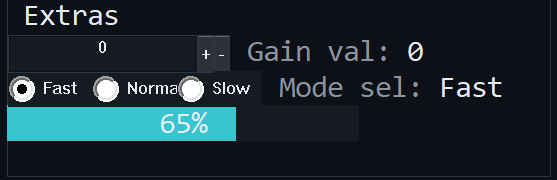
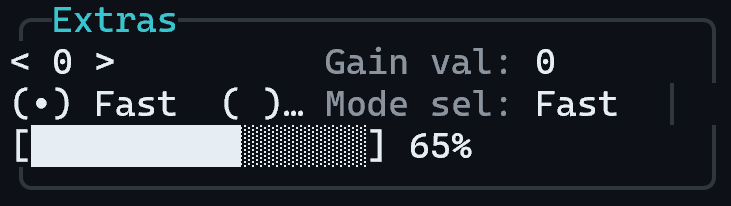
欄位與旗標:label(框的標題)、min_w、h(一定要給,涵蓋要圍住的列數)、flags=DECORATION。
編輯器:拖出 Group Box(Toolbox 預設 H = 5 且 Decoration 已勾)→ 調 H 使它涵蓋要框的列數;被框住的控制項放在它上面的列裡。沒有 C 端程式。
; groupbox.nxlay - a frame around other widgets.
; h is mandatory. flags=DECORATION lets it overlap the widgets it frames.
[panel]
ref_w=40
ref_h=6

[w.1]
type=GROUPBOX
y=0
min_w=30
h=3
flags=DECORATION
label=Output

[w.2]
type=CHECKBOX
y=1
x=2
min_w=16
label=Enable
常見錯誤
h = 0會被拒絕(規則 10),GROUPBOX必須明確給高度。- 要圍住別的控制項就必須設
DECORATION,否則群組框與框內控制項在垂直方向重疊,會被「跨列不可重疊」規則擋下(規則 4),整份宣告都被拒絕。 - 群組框本身不能聚焦;
DECORATION讓它畫在其他控制項的下面。 - 兩個版本外觀不同:終端機版是圓角框加標題,視窗版是一圈細框線,標題嵌在上緣,顏色是很淡的閒置邊框色,不像終端機版那麼醒目。框裡的 widget(
SPIN、CHOICE等)畫在框的上面。
CHART:簡易長條圖
用途:把一串數值畫成一列高低不同的長條(趨勢圖)。目前只有終端機版畫得出來,視窗版沒有圖表繪製器,只會顯示 [?]。
所以要在兩個版本都看得到,請改用 METER/VALUE,或用 Canvas 模式自己畫。


欄位與旗標:num_min、num_max(縱軸範圍。num_max 非 0 時必須大於 num_min,否則宣告被驗證拒絕;num_max 留 0 雖然通得過驗證,但所有長條都會畫成最低一階,所以一定要填)、min_w、h(h 至少 2 列且 label 非空才會畫標題)。
編輯器:拖出 Chart(Toolbox 預設 H = 4、範圍 0~100)。Inspector 對 CHART 只有 H 與 Activatable,沒有 NumMin/NumMax/Label;
要改範圍或標題,用文字編輯器直接改 .nxlay(編輯器重新存檔時會保留這些欄位)。
; chart.nxlay - a small bar chart; the samples come from C (0..65535).
; num_min/num_max define the vertical range.
[panel]
ref_w=40
ref_h=6

[w.1]
type=CHART
y=0
min_w=24
weight=1
h=3
num_min=0
num_max=100
label=Signal/**
* @file chart.c
* @brief Feeding a CHART with samples.
* A reading aid for the tutorial page "widget-types", not a complete
* plugin: the functions below would be wired into an IcPlugin
* (on_widget_event) or called from init()/a Worker callback.
*
* @note ASCII-only and C89 on purpose (VC6 / CP950 safe, and it must pass
* the syntax-only guard). The widget ids match chart.nxlay.
*/
#include <string.h>
#include "nexus_plugin_api.h"
/** @brief The HostAPI table, saved by init() (not shown here). */
static const NxHostApi *s_host = (const NxHostApi *)0;
/** @brief widget id of the CHART ([w.1] in chart.nxlay). */
#define WID_SIGNAL 1
/**
* @brief Replaces the samples (0..65535 each, at most 256).
* @param[in] samples Array of count values; NULL clears the chart.
* @param[in] count Number of samples; more than 256 refuses the whole batch.
* @return ERR_OK, ERR_NOT_FOUND, or ERR_FULL.
* @note NX_WP_SERIES is a BLOB: an NxSeriesHead (format, count) followed by
* the samples as 16-bit little-endian values, written byte by byte so
* it does not depend on the host's byte order. Samples are state and do
* not rebuild the panel. The bars are scaled by the declared
* num_min..num_max.
*/
NxLong chart_feed(NxPluginCtx ctx, const NxWord *samples, NxWord count)
{
unsigned char buf[4 + 2 * NX_WSERIES_MAX_SAMPLES];
NxPropVal v;
NxWord i;
if (samples == (const NxWord *)0)
{
count = 0;
}
if (count > NX_WSERIES_MAX_SAMPLES)
{
return ERR_FULL;
}
buf[0] = (unsigned char)NX_WSERIES_FMT_U16;
buf[1] = 0;
buf[2] = (unsigned char)(count & 0xFF);
buf[3] = (unsigned char)((count >> 8) & 0xFF);
for (i = 0; i < count; i++)
{
buf[4 + 2 * i] = (unsigned char)(samples[i] & 0xFF);
buf[4 + 2 * i + 1] = (unsigned char)((samples[i] >> 8) & 0xFF);
}
memset(&v, 0, sizeof(v));
v.SizeOfStruct = (NxDword)sizeof(v);
v.kind = (NxWord)NX_WKIND_BLOB;
v.u.blob.ptr = buf;
v.u.blob.len = (count == 0) ? 0 : (NxDword)(4 + 2 * count); /* zero length = no samples */
return s_host->SetWidgetProp(ctx, 0, WID_SIGNAL, NX_WP_SERIES, &v);
}常見錯誤
- 樣本是 16 位元(0~65535),最多 256 個,以
NX_WP_SERIESblob(NxSeriesHead加小端樣本)寫入;超過整批拒絕(ERR_FULL)。 - 樣本數多於可用欄數時,終端機版等距取樣,頭尾都會畫到。
- 視窗版畫不出來時,資料照樣寫得進去,只是畫面是
[?],也沒有任何錯誤碼告訴你(4.0 起沒有 Chart 專用的能力位元可查)。 - 樣本是狀態,不會使面板重建。
IMAGE:點陣圖
用途:顯示一張圖(logo、示意圖)。視窗版載入並拉伸到控制項的矩形;終端機版一律只畫 [image: 檔名] 這樣的占位文字。


欄位與旗標:aux(圖檔名,BMP 或 ICO)、min_w、h。ACTIVATABLE 選用。label 不畫。
編輯器:拖出 Image(預設 Aux = image.bmp、H = 3)→ 改 Aux、H。沒有 C 端程式:圖檔在面板建立時載入。
; image.nxlay - a bitmap. aux is a plain file name (BMP or ICO) that lives
; next to the plugin DLL; no path separators, no "..".
[panel]
ref_w=40
ref_h=6

[w.1]
type=IMAGE
y=0
min_w=10
h=3
aux=logo.bmp
常見錯誤
- 圖檔要放在 Plugin DLL 所在的資料夾,
aux只寫檔名。aux裡不能有\、/、:或..,否則整份宣告被拒絕(規則 10)。 - 只支援 BMP 與 ICO。載入失敗(找不到或格式不對)時畫占位文字,並在 Log 記一則警告
IMAGE widget N: could not load ...,面板照常運作。 - 終端機版永遠看不到圖,所以圖不能是唯一的資訊來源。
FILEPICK:檔案選擇
用途:讓使用者選一個檔案。視窗版是一個輸入框加「Browse…」按鈕,按下開標準的開檔對話框(只能選存在的檔案,篩選條件來自 aux);
終端機版沒有對話框,退化成一個文字框,使用者直接打路徑。


欄位與旗標:aux(篩選字串,例如 *.bin)、min_w、weight。label 不畫。
編輯器:拖出 File Picker(預設 Aux = *.txt)→ 改 Aux。
; filepick.nxlay - a file chooser; aux is the filter shown in the dialog.
[panel]
ref_w=40
ref_h=4

[w.1]
type=FILEPICK
y=0
min_w=24
weight=1
aux=*.bin
label=Firmware/**
* @file filepick.c
* @brief Reading the path a user picked in a FILEPICK.
* A reading aid for the tutorial page "widget-types", not a complete
* plugin: the functions below would be wired into an IcPlugin
* (on_widget_event) or called from init()/a Worker callback.
*
* @note ASCII-only and C89 on purpose (VC6 / CP950 safe, and it must pass
* the syntax-only guard). The widget ids match filepick.nxlay.
*/
#include <string.h>
#include "nexus_plugin_api.h"
/** @brief The HostAPI table, saved by init() (not shown here). */
static const NxHostApi *s_host = (const NxHostApi *)0;
/** @brief widget id of the FILEPICK ([w.1] in filepick.nxlay). */
#define WID_FIRMWARE 1
/**
* @brief Reads the currently chosen path.
* @param[in] ctx This mount's context.
* @param[out] path Receives the path (empty string when nothing was chosen).
* @param[in] cap Capacity of path; 264 bytes always fit (the path is at most 263 bytes plus the NUL).
* @return ERR_OK; ERR_BUFFER_TOO_SMALL; ERR_NOT_FOUND when the widget does not exist.
* @note The path is the VALUE of the widget (a string). Picking a file also
* sends NX_WEVT_CHANGED, but reading it on demand, for example in the
* handler of a "Start" button, is just as good.
*/
NxLong filepick_path(NxPluginCtx ctx, char *path, NxDword cap)
{
NxPropVal out;
NxDword needed = 0;
memset(&out, 0, sizeof(out));
out.SizeOfStruct = (NxDword)sizeof(out);
return s_host->GetWidgetProp(ctx, 0, WID_FIRMWARE, NX_WP_VALUE, &out, path, cap, &needed);
}
/**
* @brief Presets the path shown in the box (e.g. the last used file).
*/
NxLong filepick_preset(NxPluginCtx ctx, const char *path)
{
NxPropVal v;
memset(&v, 0, sizeof(v));
v.SizeOfStruct = (NxDword)sizeof(v);
v.kind = (NxWord)NX_WKIND_STR;
v.u.str.ptr = path;
v.u.str.len = (NxDword)strlen(path);
return s_host->SetWidgetProp(ctx, 0, WID_FIRMWARE, NX_WP_VALUE, &v);
}常見錯誤
- 路徑就是控制項的值(字串):選了檔案會送
NX_WEVT_CHANGED,也可以在需要的時候(例如「開始」按鈕的處理函式裡)用GetWidgetProp(…, NX_WP_VALUE, …)讀。 - 路徑最多 263 位元組。
GetWidgetProp的緩衝區用 264 位元組就一定放得下;太小回ERR_BUFFER_TOO_SMALL,needed會告訴你需要多少。 - 沒選過檔案時讀到空字串,不是錯誤。
aux也受規則 10 限制:不能含\、/、:、..。
接下來
- 想用滑鼠拖曳排版、即時看兩個版本的預覽:nxlayout 工具與視覺化編輯器。
- 遇到宣告被拒絕、控制項不見了:除錯與常見錯誤。